Payroll Deduction

Did you know... if you are using our Payroll Deduction feature, you can now print a transaction report in TLV showing the employee code and name?

Learn how you can print employee code and name on your reports.


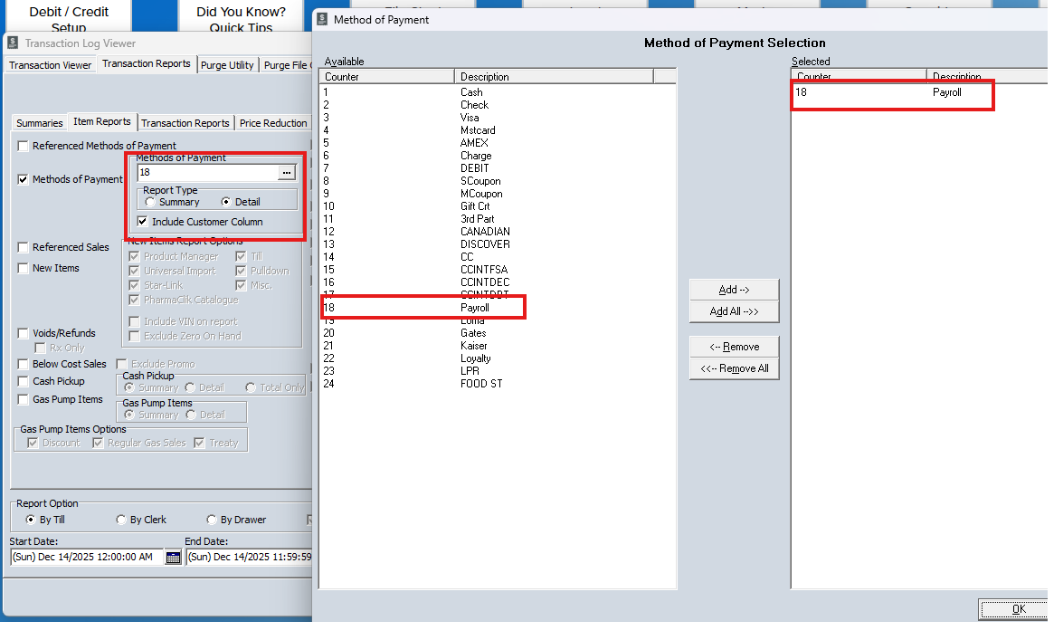
Go to Item Reports subtab in the Transaction Reports section of TLV and select the Payroll Deduction method or payment, select Detail and check the Include Customer Column checkbox as shown below. 
 

Subscribe to the RMS Weekly Newsletter

Be first to know about new blog posts, special announcements, product launches, upcoming events, CLIMB content, and more from your favorite pharmacy POS partner.